
Collanos in the Media
 December 6
AlternativeTo: Collanos as Alternative on Mac Desktop
December 6AlternativeTo: Collanos as Alternative on Windows Desktop
 November 2
aktien-meldungen.de: Einsparungen und Effizienzsteigerungen durch Web-2.0-Portallösungen
November 2aktien-meldungen.de: Einsparungen und Effizienzsteigerungen durch Web-2.0-Portallösungen
September 28Software News: Collanos Workplace: Free Team Collaboration Software
 Subscribe in a reader
Subscribe by Email
Collanos Press Releases
March 3
Collanos and Translumina Networks launch the LumiMagic telephone switchboard for SMBs
March 3
Collanos und Translumina Networks lancieren die LumiMagic Telefonzentrale für kleine und mittelständische Unternehmen
January 21
Collanos Wins "Red Herring 100 Global" Award
Subscribe in a readerSubscribe by Email
Collanos Blog
Collanos Forum
Ambassadors Activities
User Quotes
Great product alternative to Groove 2007. We have been using Groove for a while, but you now need to buy the entire Office 2007 suite to get Groove. We have therefore found an alternative in you guys.
— Matthew Ryan, Cordelta - Canberra, Australia 
Creating Object Folders
Posted November 25th, 2007 by franco.dalmolin
Related Tasks:
Once you enable the view of Object Folders (See: Viewing Object Folders ) you will be able to create a new one during the process of creating a new folder.
- When creating a folder check the box "Object Type" and click the "Browse" button to select an Object Type.

The "Object Types" dialog opens.
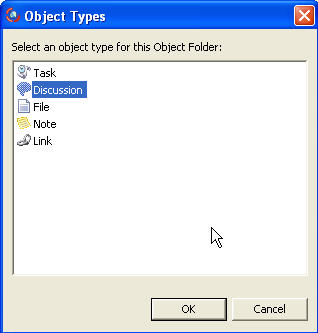
- Select an Object Type.
In this example, we have selected a Task Object.The Object Folder is created and displayed in the folder structure.

- Now you can go ahead and add Task objects to the folder.
Notice how only Task objects can be added to the new folder.To learn how to customize the Object Table view see: Customizing Object Tables.
Related Tasks: