
Collanos in the Media
 December 6
AlternativeTo: Collanos as Alternative on Mac Desktop
December 6AlternativeTo: Collanos as Alternative on Windows Desktop
 November 2
aktien-meldungen.de: Einsparungen und Effizienzsteigerungen durch Web-2.0-Portallösungen
November 2aktien-meldungen.de: Einsparungen und Effizienzsteigerungen durch Web-2.0-Portallösungen
September 28Software News: Collanos Workplace: Free Team Collaboration Software
 Subscribe in a reader
Subscribe by Email
Collanos Press Releases
March 3
Collanos and Translumina Networks launch the LumiMagic telephone switchboard for SMBs
March 3
Collanos und Translumina Networks lancieren die LumiMagic Telefonzentrale für kleine und mittelständische Unternehmen
January 21
Collanos Wins "Red Herring 100 Global" Award
Subscribe in a readerSubscribe by Email
Collanos Blog
Collanos Forum
Ambassadors Activities
User Quotes
Collanos Workplace, on the other hand has a comfortable, elegant interface that doesn't make it hard to use.
— Scott Rhoades, Writer,
Viewing Object Folders
Posted November 25th, 2007 by franco.dalmolin
Related Tasks:
By default Object Folders are hidden from users.
To enable the view of Object Folders:
- Click on "Tools" from the Workspace Menu and select "Preferences".
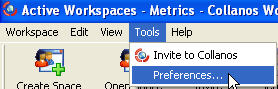
The "Preferences" Dialog opens.
- Click on the check box to "Enable Object-Specific Folders".
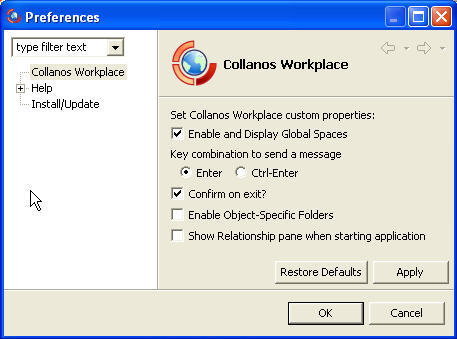
Once the check box is filled, you will be able to create Object Folders as part of the process of creating a new folder.

Notes:
Object Folders can be created for any object type.
Existing folders cannot be converted to Object Folders.
Related Tasks: