
Collanos in the Media
 März 24
OSTATIC: 6 Open Source Resources To Help You Get More Done
März 15NotebookReview.com: Collanos - Project Collaboration Software
 März 14
netzwelt: Collanos Workplace: Der virtuelle Arbeitsplatz
Dezember 6AlternativeTo: Collanos as Alternative on Mac Desktop
Dezember 6AlternativeTo: Collanos as Alternative on Windows Desktop
 Subscribe in a reader
Subscribe by Email
Collanos Press Releases
März 3
Collanos and Translumina Networks launch the LumiMagic telephone switchboard for SMBs
März 3
Collanos und Translumina Networks lancieren die LumiMagic Telefonzentrale für kleine und mittelständische Unternehmen
Januar 21
Collanos Wins "Red Herring 100 Global" Award
Subscribe in a readerSubscribe by Email
Collanos Blog
Collanos Forum
Ambassadors Activities
Deleting Global Spaces
Posted November 25th, 2007 by franco.dalmolin
Related Tasks:
To delete a Global Space you need to be in the "All My Workspaces" view.
- Highlight the Global Space you want to delete and then click on the "Delete" button.
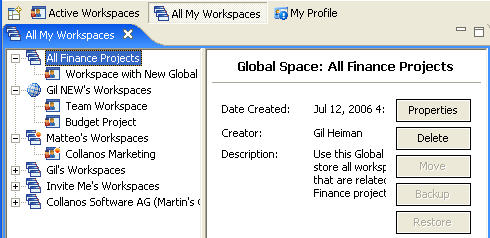
The "Confirm Global Space Delete" dialog opens.
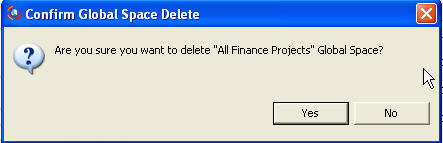
- Click on the "Yes" button to delete the Global Space.
The Global Space and all the included workspaces are deleted from your and ALL other team members' computers.
Notes:
- The default Global Spaces, assigned to every user, cannot be removed.
- Only Managers can delete a non-default Global Space.
Related Tasks: