
Collanos in the Media
 December 6
AlternativeTo: Collanos as Alternative on Mac Desktop
December 6AlternativeTo: Collanos as Alternative on Windows Desktop
 November 2
aktien-meldungen.de: Einsparungen und Effizienzsteigerungen durch Web-2.0-Portallösungen
November 2aktien-meldungen.de: Einsparungen und Effizienzsteigerungen durch Web-2.0-Portallösungen
September 28Software News: Collanos Workplace: Free Team Collaboration Software
 Subscribe in a reader
Subscribe by Email
Collanos Press Releases
March 3
Collanos and Translumina Networks launch the LumiMagic telephone switchboard for SMBs
March 3
Collanos und Translumina Networks lancieren die LumiMagic Telefonzentrale für kleine und mittelständische Unternehmen
January 21
Collanos Wins "Red Herring 100 Global" Award
Subscribe in a readerSubscribe by Email
Collanos Blog
Collanos Forum
Ambassadors Activities
User Quotes
My sense is that you guys and gals know what you're doing; you've put together an attractive tool - for free. I think it has the potential to reach a large audience. I want to help.
— Christian Aglen, MUM Uni., IO
Creating Global Spaces
Once you enable the view of Global Spaces (See: Viewing Global Spaces) you will be able to create a new Global Space during the process of creating a new workspace.
- In the tool bar, click on "Create Space".

The "Create New Workspace" wizard opens.
- After entering the Name and Description of your workspace you have two options to select from for the Global Space: "Create New" or "Select existing".
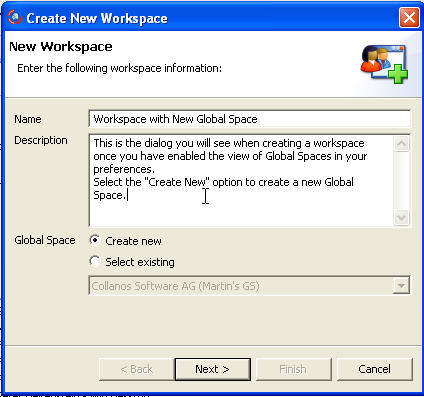
- You can select an existing Global Space from the drop down menu or create a new one.
If you select to create a new Global Space, a new dialog opens.
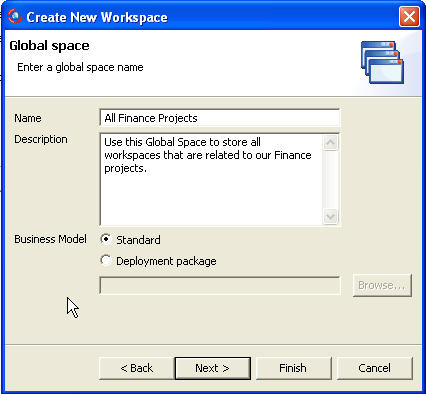
Once you enter the Name and Description, you have the option to select a Business Model.
The "Business Model Designer" (a development tool) is not available currently but in the future will allow users to deploy customized business models with new business objects.
For now, select the default option, "Standard".From this point, the standard "Create Workspace" continues.
Once you complete the wizard, your Global Space will be visible in the 'All My Workspaces" view.
Related Tasks: