
Collanos in the Media
 December 6
AlternativeTo: Collanos as Alternative on Mac Desktop
December 6AlternativeTo: Collanos as Alternative on Windows Desktop
 November 2
aktien-meldungen.de: Einsparungen und Effizienzsteigerungen durch Web-2.0-Portallösungen
November 2aktien-meldungen.de: Einsparungen und Effizienzsteigerungen durch Web-2.0-Portallösungen
September 28Software News: Collanos Workplace: Free Team Collaboration Software
 Subscribe in a reader
Subscribe by Email
Collanos Press Releases
March 3
Collanos and Translumina Networks launch the LumiMagic telephone switchboard for SMBs
March 3
Collanos und Translumina Networks lancieren die LumiMagic Telefonzentrale für kleine und mittelständische Unternehmen
January 21
Collanos Wins "Red Herring 100 Global" Award
Subscribe in a readerSubscribe by Email
Collanos Blog
Collanos Forum
Ambassadors Activities
User Quotes
This piece of software of yours is just great! It has such potential and with a little help from everyone out here in the void, it will make a lot of people happy (The Collanos team included!).
— Hans Arvid Mattsson, LAMA Promotion, Sweden 
Renaming Global Spaces
Posted November 25th, 2007 by franco.dalmolin
Related Tasks:
To rename a Global Space you need to be in the "All My Workspaces" view.
- Highlight the Global Space you want to rename and then right click and select "Properties" from the menu.
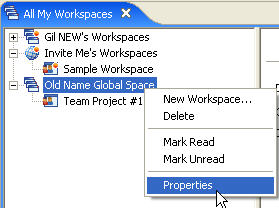
The "Global Space Properties" dialog opens.
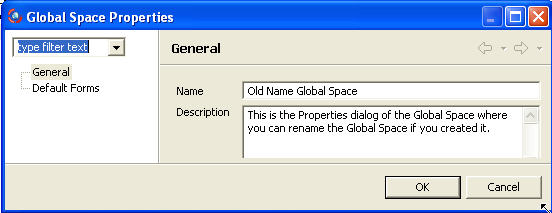
- Enter the new name and click the"OK" button.
The new name is applied to the Global Space.
Notes:
- You cannot Rename the Default Global Space of other users.
You can only rename your default Global Space and all other non-default Global Spaces. - Renaming the Global Space will also take place on all team members' computers once they synchronize with your computer.
- Only Managers can rename a Global Space.
Related Tasks: