
Collanos in the Media
 December 6
AlternativeTo: Collanos as Alternative on Mac Desktop
December 6AlternativeTo: Collanos as Alternative on Windows Desktop
 November 2
aktien-meldungen.de: Einsparungen und Effizienzsteigerungen durch Web-2.0-Portallösungen
November 2aktien-meldungen.de: Einsparungen und Effizienzsteigerungen durch Web-2.0-Portallösungen
September 28Software News: Collanos Workplace: Free Team Collaboration Software
 Subscribe in a reader
Subscribe by Email
Collanos Press Releases
March 3
Collanos and Translumina Networks launch the LumiMagic telephone switchboard for SMBs
March 3
Collanos und Translumina Networks lancieren die LumiMagic Telefonzentrale für kleine und mittelständische Unternehmen
January 21
Collanos Wins "Red Herring 100 Global" Award
Subscribe in a readerSubscribe by Email
Collanos Blog
Collanos Forum
Ambassadors Activities
User Quotes
This piece of software of yours is just great! It has such potential and with a little help from everyone out here in the void, it will make a lot of people happy (The Collanos team included!).
— Hans Arvid Mattsson, LAMA Promotion, Sweden 
Copying Links to Objects
In Collanos you have the option to create a link to a certain object and then paste the link within the text area of another object.
We call the ability to link objects “Copy as Link” functionality. Copy as Link functionality is similar to pasting links to web addresses but in this case you are pasting links to objects within the same workspace.
Currently you can copy links to any object types but can only paste the links in the text area of a Discussion object. This is very useful when you want to refer to a certain object within a Discussion. By pasting a link to it the other team members can quickly access it.
You do not have to paste the link to a Discussion within the same folder. So long as you are in the same workspace, you can paste the link in any Discussion, regardless of the folder in which it resides.
- To copy a link to an object, highlight the object, right-click and select the "Copy as Link" option.

- In the text area of a Discussion or in a different folder in the workspace, wherever you want to paste the link, right-click and select the "Paste".
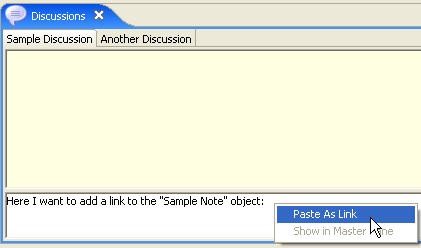
The link to the object is pasted in the Discussion and the text is displayed in a blue font.

When a team member clicks on the link the linked object will be highlighted.
Once team members synchronize with your computer, the link will also be updated in their workspaces.
Notes:
- Currently you can only copy and paste links to objects within a given workspace.
You cannot copy and paste between different workspaces.
To learn more about Content Objects see the Content Objects FAQ.
Related Tasks: