Collanos in the Media
 November 7
Scent of Life: OpenProj
 October 31
IT Reseller: Peter Helfenstein - Always in Action (German)
 October 20
PRESSEBOX: From the Award to Market Entry with Huber Verlag (German)
 October 7
Brothersoft Editor's Blog: Picks of the Week for Internet October 7, 2008
October 1Netzwoche: Voice Collaboration (German)
 Subscribe in a reader
Subscribe by Email
Collanos Press Releases
Collanos Blog
Collanos Forum
Ambassadors Activities
User Quotes
All in all I love this application. I haven't found another one that does what it does nearly as well and certainly not for free. Keep up the good work.
— Kevin Flanigan, Medical University Employee
Add Content
Once you have created the folder structure, you can start adding content.
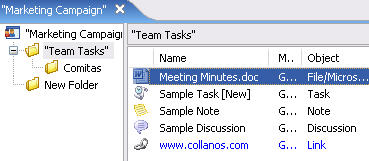
Content can be in the form of files (or "File Objects") that already exist on your computer, such as MS Office documents, PDF files and images, or Collanos Business Objects.
Collanos Business Objects allow you to create structured content with additional features. Currently, these objects include: "Notes", "Discussions", "Tasks" and "Links".
To learn more about these Business Objects, see: User Guide: Object Types.
Note:
- Content can also be added to your workspace prior to inviting members.
- Action: To add a new object to your workspace, highlight one of the folders and then click on one of the object icons in the tool bar.

Result: Each object triggers its respective dialog window, prompting you to enter or select information related to that specific object-type.

For example, clicking on the "Add File" icon prompts you to select a file from your computer. - Action: Enter the required information or select the file you want to add to your workspace.
Result: The new object is added to the folder.
You have completed the four steps of the Getting Started Guide.
To learn more about these and other features and functionality in the application, we recommend you read the User Guide.
Related Tasks: