Collanos in the Media
 November 7
Scent of Life: OpenProj
 October 31
IT Reseller: Peter Helfenstein - Always in Action (German)
 October 20
PRESSEBOX: From the Award to Market Entry with Huber Verlag (German)
 October 7
Brothersoft Editor's Blog: Picks of the Week for Internet October 7, 2008
October 1Netzwoche: Voice Collaboration (German)
 Subscribe in a reader
Subscribe by Email
Collanos Press Releases
Collanos Blog
Collanos Forum
Ambassadors Activities
User Quotes
I have been looking for some kind of collaboration tool or suite of tools for my client …and Collanos seems to fit the bill. I’m liking it - its ease of use … its intuitive design.
— Rory Chalcraft, Blogger, NJ
Add Folders
Posted August 13th, 2007 by gil
Related Tasks:
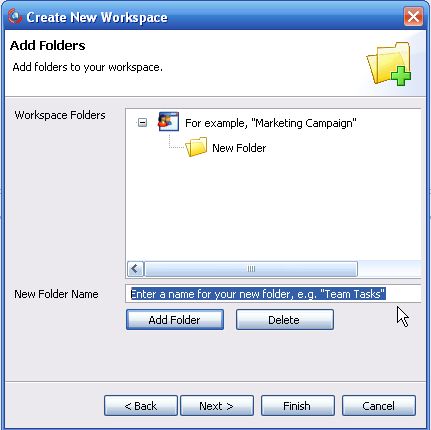
Now that you have completed the first step of creating a workspace, you can proceed to the next step of adding folders.
- Action: Add a new folder to your workspace by entering the name and then clicking on the "Add Folder" button.
Notes:
- You can repeat this step to add multiple folders.
- You can also skip this step and add more folders or sub-folders later on, after completing this wizard.
- If you want to delete a folder you just created, highlight it with your mouse and then click on the "Delete" button.
Result: The new folder/s are displayed in the structure.

- Action: Click on the "Next" button.
Result: The next step of the wizard opens.
Step 3: Inviting Members to Your Workspace
Related Tasks: