Collanos in the Media
 October 20
 October 7
Collanos Press Releases
Collanos Blog
Collanos Forum
User Quotes
Usually I don't send this kind of feedback, but for your software I'll make an exception. Just one sentence, it's damn good, I use it for only one week and I don't want to work without it.
— Pascal Laveaux, SL & Associates, Belgium 
Add Folders
Posted August 13th, 2007 by gil
Related Tasks:
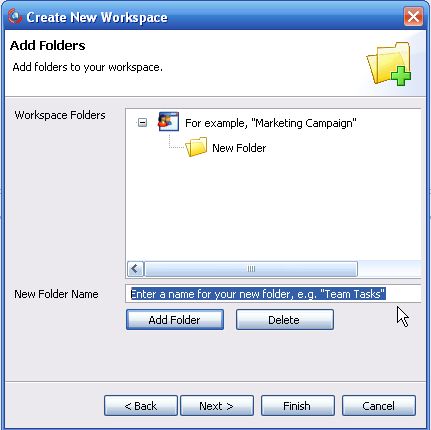
Now that you have completed the first step of creating a workspace, you can proceed to the next step of adding folders.
- Action: Add a new folder to your workspace by entering the name and then clicking on the "Add Folder" button.
Notes:
- You can repeat this step to add multiple folders.
- You can also skip this step and add more folders or sub-folders later on, after completing this wizard.
- If you want to delete a folder you just created, highlight it with your mouse and then click on the "Delete" button.
Result: The new folder/s are displayed in the structure.

- Action: Click on the "Next" button.
Result: The next step of the wizard opens.
Step 3: Inviting Members to Your Workspace
Related Tasks: