Collanos in the Media
 Dezember 19
Red Herring Global 08: Red Herring Global 2008, 200 Finalists
 Dezember 18
Michael Sampson: Currents: Collanos Workplace 1.4
 Dezember 18
InfoWeek Online: Neue Version von Collanos Workplace (German)
 Dezember 16
Markus Albers - Journalist & Author: Working More Handsomely: Recently at the Easy Economy Coworking Conference (German)
Dezember 15jdk - Das Enterprise Content Management Portal: Collanos bietet gratis Collaboration Software Collanos Workplace
 Subscribe in a reader
Subscribe by Email
Collanos Press Releases
Collanos Blog
- Comment on PR: Unsere kostenlose P2P Teamwork Software ist da! by neitnerpops
- Comment on Unified Collaboration kostenlos (German) by Schöner arbeiten: Neulich auf der Easy-Economy-Coworking-Konferenz - Peter, Sebastian, Lang, Referenten, Alexander, Jörg, Arbeit, Zukunft - Markus Albers — Journalist & Autor
- Comment on Unified Collaboration kostenlos (German) by Peter Helfenstein
Collanos Forum
Ambassadors Activities
Create Workspace
Posted August 12th, 2007 by gil
Related Tasks:
To create a workspace you first need to enter some general information about your workspace.
- Action: In the tool bar, click on "Create Space".

Result: The "Create New Workspace" wizard opens.
- Action: Enter the Name and Description of your workspace and then click on the "Next" button.
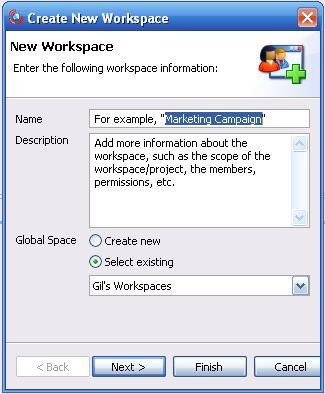
Result: The next step of the wizard opens.
Step 2: Adding Folders to Your Workspace
Related Tasks: