Posts Tagged ‘Voice’

Collanos Nominated at CeBIT for the IT INNOVATION PRIZE in two Categories

Wednesday, March 4th, 2009

At CeBIT 2009, Collanos and Translumina Networks will be launching LumiMagic, which is a cost-effective Linux box combining the functions of a VoIP telephone switchboard, network router, and WLAN access point. When integrated into a Collanos collaboration network, it offers companies and their partners a comprehensive communications and collaboration platform. The latest versions of Collanos Workplace and Collanos Phone will also be on display. Making its first appearance at the CeBIT (Booth A56/Hall 13) as part of the “Triple Play & more” consortium, Collanos will be exhibiting its software for electronic team collaboration among multiple organizations.
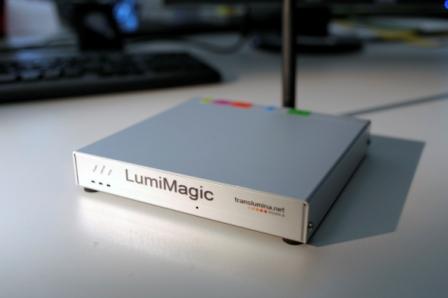
LumiMagic VoIP PBX

Collanos and Translumina Networks launch the LumiMagic telephone switchboard for SMBs

LumiMagic epitomizes the SMB (small and medium-sized businesses) telephone switchboard of the future. Oriented to the needs of SMBs, the compact, cost-effective Linux box combines the services of a VoIP telephone switchboard, network router, and wireless LAN access point in a single package. The innovative integration of the telephone switchboard into a Collanos collaboration network provides a company’s employees with the most direct communication paths and comprehensive teamwork support – all at low cost and regardless of their individual locations.

Every employee and every Collanos user at a supplier, partner, or customer location can be integrated into the company’s communications and collaboration network. Employees can thus be reached via their company phone number, and when it comes to their collaborative work with others within or outside the company, they can take advantage of functions geared toward team information sharing, instant messaging, telephone conferences, and project management. In doing so, telephony as well as Internet-based collaboration with every other employee and Collanos user worldwide is free of charge. Phone connections to the public telephone network are very inexpensive thanks to the typical low-cost VoIP telephone rates.

New Collanos Version

To be introduced at the CeBIT, Collanos’ latest Version 1.4.0.2 features many new functions and enhancements. New Premium services have been added to Collanos Workplace and Collanos Phone. For example, all users can now be reached at their own Collanos phone number from any public telephone.

Collanos Receives Dual Nominations for the 2009 IT INNOVATION PRIZE.

Collanos has been nominated for the “2009 IT INNOVATION PRIZE” at this year’s CeBIT for its innovative solution geared especially toward small and medium-sized businesses. That puts Collanos in the top three in the “Unified Communications” and “Special Awards – Switzerland” categories. The winners will be announced on March 5 at the official CeBIT awards ceremony.

Prices and Availability

Collanos Software products are free of charge and can be downloaded at http://www.collanos.com. Prices for LumiMagic vary depending on the package ordered and start at Euro 129 plus a monthly flat rate of Euro 19.

About Triple Play & more

”Triple Play & more” is a consortium of companies operating in the telecommunications and multimedia industries. Their areas of activity include construction, operations, maintenance, and financing of multimedia platforms as well as the development and sales of telecommunications and interactive multimedia services that are consolidated on telephony, broadband Internet, and television end devices.

In addition to companies of the Translumina Group (Translumina Networks, Comitas, Lambdastream, three60mobile), Triple Play & more also includes Collanos Software, CTModule, NetModule, AareNet, MHM and BlueBit.

Sphere: Related Content

Team - It’s Time to Talk

Wednesday, January 28th, 2009

Collanos Workplace 1.4. integrates Collanos Phone’s voice functions. Three voice services are now available to teams.

1. Call Your Contacts/Members for Free

You can call any other Collanos user for free, if the connection can be established directly over the Internet. These direct calls can be set up in a number of ways. Generally, the command is contained in the context menu if you click on the contact or member directly. Sometimes you will also find a “Call” button in Collanos Workplace’s tool bar. When such a direct free call is established between two Collanos users, the Collanos Phone application will open automatically on both sides.

2. Call Your Contacts’/Members’ Regular Phone Numbers (Dial-Out Premium Service)

If you have purchased dial-out credit, you can call Collanos Workplace contacts and members on their regular phones. To do this, use again the context menu, but select “Dial-Out” and then one of the available numbers “Office”, “Home” or “Mobile”.

Phone Numbers in User Profile
Each Collanos user can set and change his regular phone numbers in his or her own user profile. Fill out these fields so that your contacts and friends are able to contact you even when you are not in from of your computer.

Purchase Dial-Out Phone Credit (Premium Service)
Dialing-out to regular phone numbers is a premium service. To be able to use this service, users need to purchase dial-out credit on Collanos’ secure web shop, using a VISA or MasterCard credit card.

Voice Box and Redirect Feature
Quite interesting especially for traveling users are the voice box and the call-redirect feature. Settings for these features can be made on the user’s account pages on Collanos’ secure web site.

Voice messages left for the user on his voice box are automatically forwarded to the user’s email.

Call Redirect redirects calls intended for Collanos Phone to a regular phone number, for instance to a mobile phone. Your team members and contacts will still be able to call you for free on your Collanos Phone, but the calls will be redirected to another number after a defined time. This feature is automatically available for all users that have a positive phone credit balance on their account.

3. High-quality Team Calls

There are two different kinds of team calls available in Collanos Workplace.

  • The first is based on the central conference service and supporting up to 10 participants.
  • The second is working between Collanos Phones only (no central server involved), but is limited to 3 participants.

The advantage of the central service is that conference call details such as “Subject”, “Description” and “List of Participants” are being sent by Workplace message as well as by Email to all participants. The Collanos Phone based conference on the other hand is directly calling the other two participants.

You can start a conference call by clicking on the button in Collanos Workplace’s toolbar at any time:

Central Conference Service
To establish a call based on the central conference service, use the first tab and fill in the form, such as:

  • Conference call subject
  • Conference call description (e.g. an agenda or the goals of this call)
  • PIN code to protect the call
  • Delay before the call starts (a good idea is to give a 5 or 15 minutes advance notice before starting)
  • Desired participants

After starting such a conference call by clicking on “Start” button, all participants will receive a notification message, both in form of a Workplace chat message (system generated) and email notification. The email notification has one additional element, it contains a web link to automatically join the call.

Collanos Phone Conference
To establish a Conference Call that is started directly from your Collanos Phone, as well as the audio mixed on your local computer, use the second tab.

Sphere: Related Content